
Guest WiFi, explained
What is a captive portal, actually?
It's the login screen every guest WiFi network has, whether anyone designed it or not: the page a device is redirected to before it gets internet access. Here's what it is, exactly how it works under the hood, and what changes when it's actually yours instead of the router's factory default.
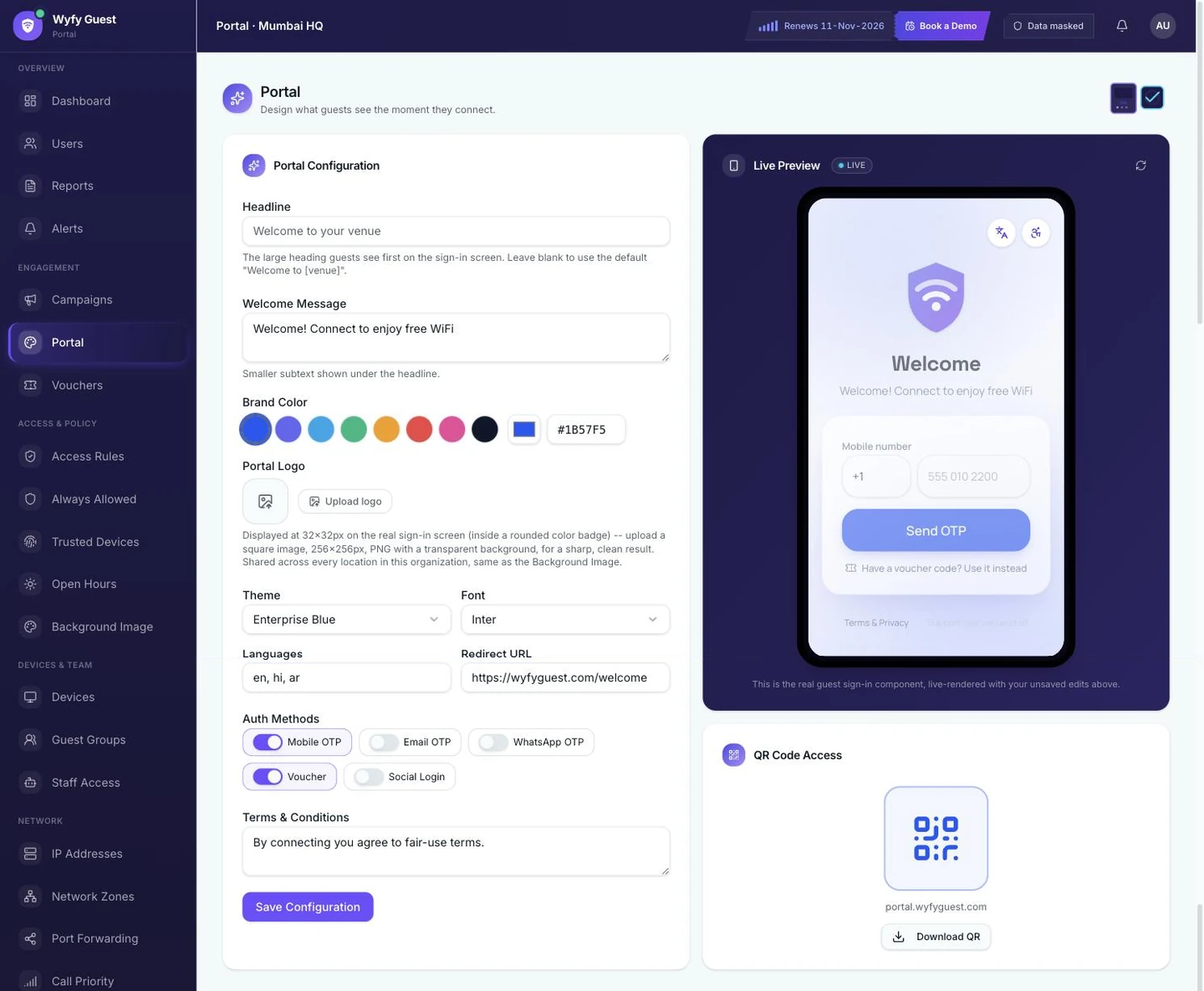
This is the real Wyfy Guest Portal editor, a live demo account, not a mockup. The panel on the right is the actual guest sign-in screen, rendering live as the settings on the left change.
The definition
A gate, not a page
A captive portal is the login page a device is redirected to before it's allowed to reach the open internet over a WiFi (or wired guest) network. "Captive" describes what happens to the device, not the guest: until it logs in, its internet traffic is held ("captive") on a walled-off segment of the network, unable to reach anything outside the portal itself.
It's not optional infrastructure and it's not a premium add-on; every WiFi network that asks a guest to sign in before browsing is running one, whether it's a polished branded screen or the router manufacturer's bare "Click to Connect" default. The only real question for a business is which of those two it's showing.
A captive portal is also a distinct layer from your WiFi password. A password (WPA2/WPA3) decides who can join the radio network at all; a captive portal decides who gets internet access once they're on it, and it's what makes an OTP, a voucher code, or a terms-of-service checkbox possible in the first place, even on a network with no password whatsoever.
Under the hood
What actually happens between "connect" and "online"
Five steps, start to finish, from a guest tapping your SSID to their device actually reaching the internet.
- 01
A device joins the network
A guest connects to your WiFi SSID like they would any network. At this point they have a network connection, but no internet access yet. The router or access point is deliberately holding their traffic back.
- 02
Their first web request gets intercepted
The instant that device tries to load anything, like a browser opening or an app checking for a connection, the network catches that request instead of letting it through, and redirects it to the portal's login page. This is what makes phones auto-pop the sign-in screen without a guest opening a browser themselves.
- 03
The guest sees your portal, not the router's
This is the one screen this whole page is actually about: your headline, your welcome message, your brand color and logo, live on a phone-sized login screen, with whichever sign-in methods you've chosen turned on for this location.
- 04
The guest logs in
Mobile OTP, WhatsApp OTP, email OTP, a voucher code, or social login, whichever methods are enabled. The portal validates it against the real backend, not a static form.
- 05
The network releases their traffic
Once they log in, that device is let through and their session starts, under whatever time limit and speed limit apply to that location, until they disconnect or the session ends.
Why it matters
The router's version is the first thing guests judge
Walk into most properties and ask to connect to guest WiFi, and you'll see the same thing: a router's factory login page. Sometimes it's a bare "Click to Connect" button on a white background. Sometimes it still carries the manufacturer's own logo. Either way, it's the first screen a guest sees after they've already checked in, ordered a coffee, or booked a desk, and it looks like nobody at the business ever opened it.
Guests don't consciously register "this router firmware is unbranded." They register "this place didn't bother," and that impression lands during checkout, or their first hour at a desk, or the exact moment they're deciding whether to come back. None of this requires a network redesign: it requires the one screen every guest is guaranteed to see to actually look like it belongs to the business they're standing in.
Read the full breakdown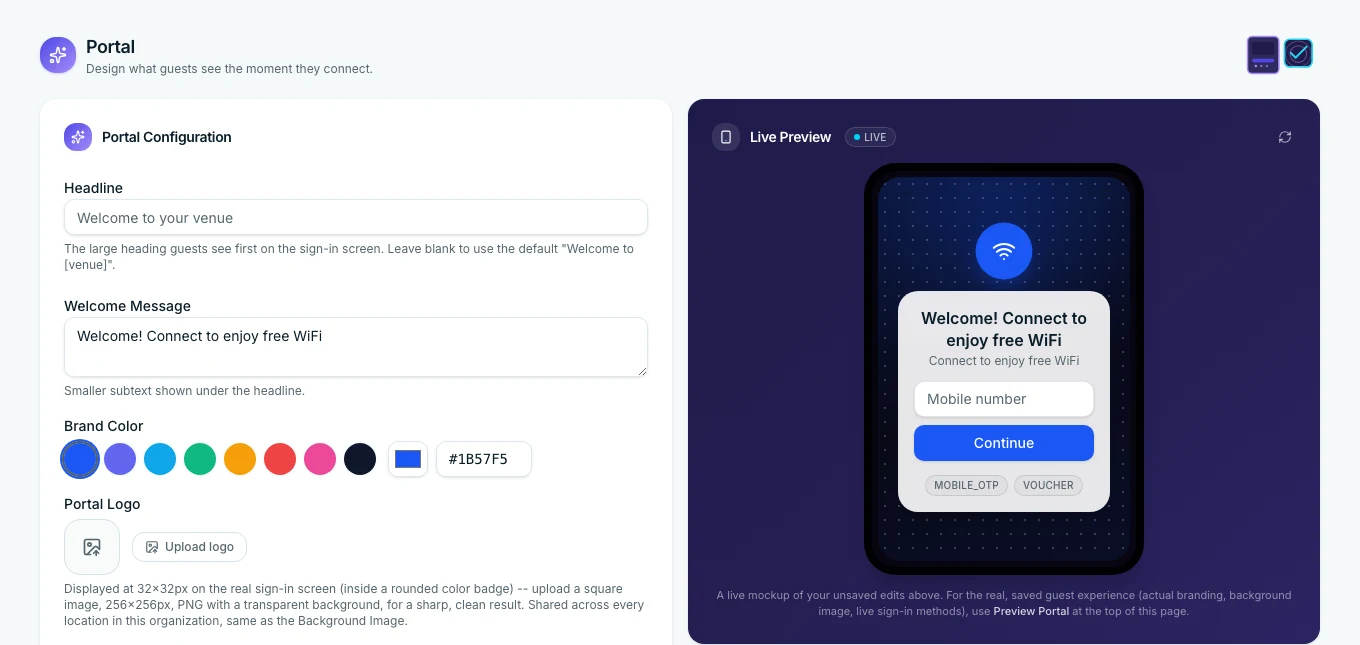
What changes
Same gate, your name on it
Branding, per location
Headline, welcome message, brand color, logo, and background image, set individually for each location rather than baked into one template for the whole account. A hotel's lobby and its rooftop bar can look nothing alike under the same login.
Sign-in method, your choice
Mobile OTP, WhatsApp OTP, Email OTP, a voucher code, or social login, turned on or off per location. A hotel might run OTP plus vouchers for front-desk handoffs; a cafe might lean on WhatsApp OTP because it's already open on a guest's phone.
Multi-language, set ahead of time
For properties with a genuinely international guest base, the portal can offer multiple languages on the same screen, chosen ahead of time, not guessed at from a browser's locale setting.
What it doesn't fix
A branded portal doesn't make your internet connection faster, and it won't stop an ISP outage on its own, that's a separate layer. It also doesn't decide bandwidth caps or session limits: that's Access Rules. What it owns is the one screen every guest is guaranteed to interact with before any of that even applies.
Questions
Captive portals, straight answers
What is a captive portal?
A captive portal is the login page a device gets redirected to before it's allowed onto the internet over a WiFi network; it's the screen you see on a hotel, cafe, or co-working WiFi before you can actually browse anything. It works by intercepting a new device's first web request and redirecting it to that login page instead, until the guest logs in (or accepts terms), at which point the network lets that device get online. Every guest WiFi network has one, whether anyone designed it or it's just the router's factory default.
Is a captive portal the same as a WiFi password?
No. A WiFi password (WPA2/WPA3) controls who can join the network at the radio level. A captive portal is a separate layer on top of that: even on an open network with no password at all, the portal still gates internet access until a guest signs in, and it's what lets you require an OTP, a voucher code, or a terms-of-service acceptance instead of (or in addition to) a shared password.
Is a "captive portal" the same thing as a "WiFi login page"?
Yes. Captive portal is the technical, networking-side name for it; WiFi login page, guest login screen, and splash page are what most people (and most guests) would call the exact same screen. There's no functional difference, just which term the person asking happens to use.
Why does the router's default captive portal look so bad?
Because it was never meant to be seen. Most consumer and small-business routers ship with a bare, unbranded splash page, sometimes just the manufacturer's logo and a "Click to Connect" button, because the manufacturer had no way to know who'd be running it or what business it would represent. It's functional, not designed, and guests can tell the difference in about two seconds.
What sign-in methods can a captive portal offer?
Wyfy Guest's portal supports Mobile OTP, WhatsApp OTP, Email OTP, a voucher code, and social login, chosen per location rather than forced into one combination. A hotel might run SMS OTP plus vouchers for front-desk handoffs; a cafe might lean on WhatsApp OTP because that's already open on a guest's phone.
Can each of my locations have a different portal?
Yes. Branding (headline, welcome message, color, logo, background image) and sign-in methods are both set per location, not per account. A hotel lobby and that same hotel's rooftop bar can run completely different portals under one login.
Does a captive portal slow down guest WiFi?
No, it only affects the moment before a guest logs in. Once they're signed in, their internet works normally; the portal isn't slowing anything down afterward.
Why isn't my captive portal login working?
A few different things get lumped together as "the WiFi is down": an OTP that never arrived, a device the network no longer treats as trusted, an Access Rules limit blocking that specific guest, or an actual outage on the portal or the internet line behind it. Each one looks different from the dashboard and has a different fix, and the network itself is rarely the real cause. Common Guest WiFi Login Problems, Explained walks through what each one actually looks like before you assume it's the router.
See your own branded portal, live, in 15 minutes.
Book a demo and we'll set up your headline, colors, logo, and sign-in methods on your own router while you watch.

